

This guide answers common GameMaker questions and clears up issues that can trip you up. It’s organized by topic so you can quickly find what you need and get back to making your game.
Table of Contents
Learning GameMaker
How do I learn GameMaker?
Start with our beginner’s guide. There’s lot of ways to learn, but this will give you a nice path to success if you’re feeling a little lost.
Gameplay Issues
My character gets stuck in the floor or the wall!
This happens when an instance is next to a wall, but when their sprite changes, the new sprite’s collision puts them technically inside of the wall, preventing them from moving.
This is often solved by using a mask, so no matter what sprite your object has, it’s collision will remain consistent!
Technical Issues
My sprites are a weird checkerboard pattern
If your sprites look fine in the room editor, but appear in-game as a checkerboard pattern, clear the texture cache by clicking on the broom icon at the top of GameMaker.

This’ll clean the cache and you should be good to go. This is a current bug and will likely be patched soon.
My game is blurry
If you’re using pixel art and your game is blurry, it’s because the default setting in GameMaker called “interpolate colors between pixels” is enabled.
To disable it:
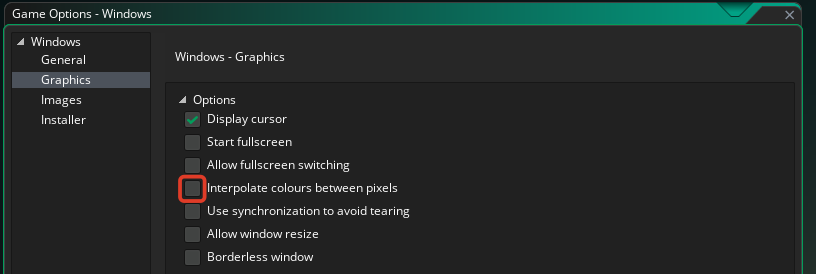
- Click on the gear icon to open game settings
- Click on the platform you’re building to
- Click on Graphics
- Uncheck Interpolate colors between pixels
- Click Apply
Helpful Links & Resources
Is your question not answered here? Check out the GameMaker Discord for help!